
What React is
Build apps out of components
React is a JavaScript library for building user interfaces. Instead of writing one big HTML page and changing it by hand, you build your app out of components — small, reusable pieces like a job card, a search box or a navigation bar — and React keeps the screen up to date for you.
The big idea: you describe what the screen should look like for the data you have right now. When the data changes, React works out what to change on the page.
| Without React | With React |
|---|---|
| "Find the list, make a new <li>, put the text in, add it to the list, update the counter…" | "Here's the list of jobs. Show a card for each one, and the count." |
| Easy to forget a step, so the page and the data get out of sync | The page always matches the data |
What you'll build
By the end of the course you'll have built this Job Tracker, and put it on the internet:
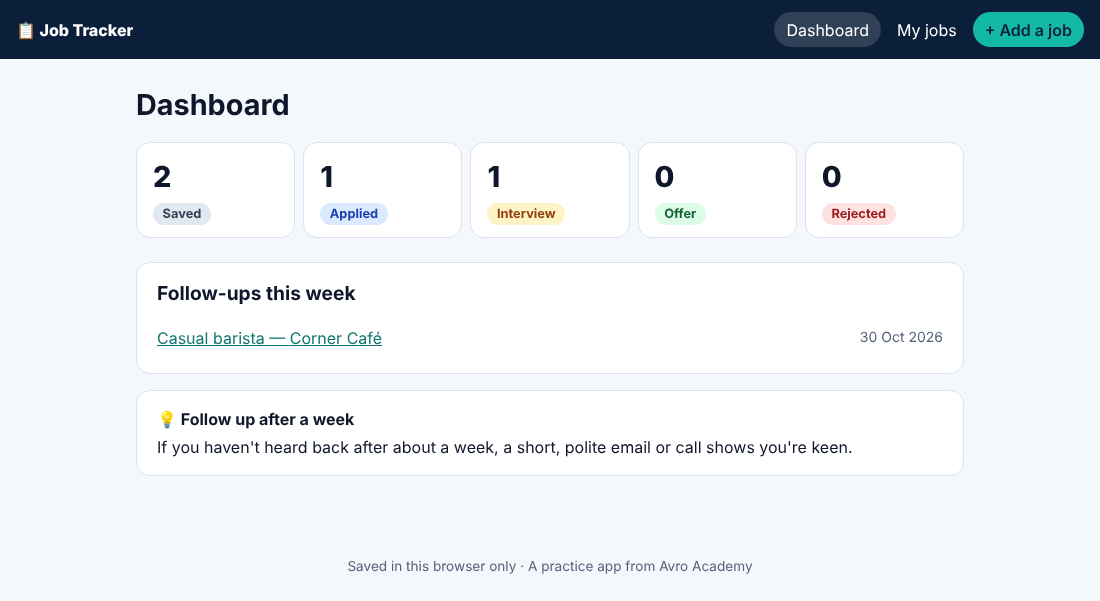
It's a real tool — use it for your own job hunt. Everything is saved in your own browser, so your information stays on your computer.
React, Vite and friends
- React draws the user interface
- Vite (say "veet") runs your app while you work and builds the final version
- TypeScript is JavaScript plus types, so your editor catches mistakes as you type
- React Router gives your app pages with their own web addresses (Module 6)
How the course works
The starter files have a folder for each module (step 1 to step 8), each a complete, working app. Build your own version as you go — and if something doesn't work, compare it with the matching folder.
This course uses React 19. React has been around since 2013, so you'll find lots of old tutorials online. Some use "class components" (class App extends React.Component) or create-react-app — both are out of date. Everything in this course uses modern function components and hooks.
Try it
Download the starter files and unzip them. Have a look inside step-8-final — by the end, you'll understand every file.
Downloads
1 file to download once you enrol.